Today I'm going to show the simplest way. And I would like to thank Charlie for his comment.
He suggested to use web_save_timestamp_param function.
web_save_timestamp_param function saves the current timestamp to LoadRunner parameter. Timestamp is the number of milliseconds since midnight January 1st, 1970 (also known as Unix Epoch).
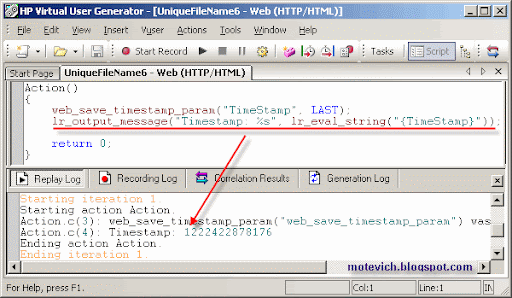
This is how web_save_timestamp_param works:
web_save_timestamp_param("TimeStamp", LAST);
lr_output_message("Timestamp: %s", lr_eval_string("{TimeStamp}"));
And the result is:lr_output_message("Timestamp: %s", lr_eval_string("{TimeStamp}"));
As I explained in this loadRunner tutorial about unique file names in LoadRunner, we have to get unique ids per virtual users with lr_whoami LoadRunner function.
So, the final LoadRunner script is:
char szFileName[256];
int vuserid, scid;
char *groupid;
lr_whoami(&vuserid, &groupid, &scid); web_save_timestamp_param("TimeStamp", LAST);
sprintf(szFileName, "%s_%d_%d_%s",
lr_eval_string("{TimeStamp}"),
vuserid,
scid,
groupid);
lr_output_message("File name: %s", szFileName);
And its result is from LoadRunner Controller:int vuserid, scid;
char *groupid;
lr_whoami(&vuserid, &groupid, &scid); web_save_timestamp_param("TimeStamp", LAST);
sprintf(szFileName, "%s_%d_%d_%s",
lr_eval_string("{TimeStamp}"),
vuserid,
scid,
groupid);
lr_output_message("File name: %s", szFileName);
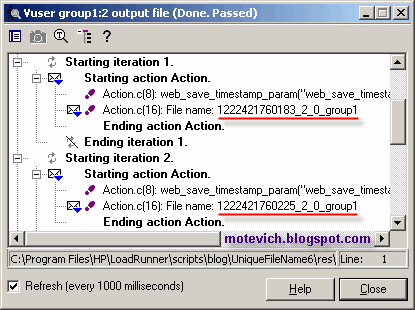 So, you can add a required file extension (txt, pdf, etc) and get a unique file name. It will work for any number of concurrent virtual users in LoadRunner Controller.
Summary:
- Shown the way how to generate unique file names in LoadRunner
- It uses web_save_timestamp_param function
Related articles:
- LoadRunner VIDEO tutorial - Parameters part3 ('Select next row' = 'Unique')
- How to get unique file name in LoadRunner
- Generating unique file name using LoadRunner parameter
- All LoadRunner visual tutorials
Do you like this LoadRunner tutorial? Would you like to receive them in the future?
If yes, please subscribe to this blog RSS feed or by Email. (How to subscribe? VIDEO guide)
Do you know that you are free to use/copy/publish all my materials on your site/blog?

 Subscribe by Email
 Subscribe to RSS feed